LOCAL FIRST · JD.COM MVP · MIT

Put e-commerce research in your agent's hands

Drive the visible Chrome / CDP already on your machine, collect products and compare peer pricing through normal page interactions, then turn one command into a structured Excel research report.

RUN / 01$ ecom collect jd "mechanical keyboard" --limit 20
MARKET SNAPSHOTJD · KEYBOARDS · 20 RESULTS
XLS
Mechanical keyboards · price study2026-08-26 10:24 · generated
COMPLETE
PRODUCT INTELLIGENCE20 PRODUCTS
PRODUCTPRICEREVIEWS
Jingzao K3 tri-mode¥299100K+
ROG Strix RX¥74950K+
Keychron V1 Max¥59820K+
Dareu A98 Pro¥429100K+
Razer BlackWidow V4¥89910K+
PRICE DISTRIBUTION / CNY¥199–899SAMPLE RANGE
5
7
4
3
1

Opportunity band: ¥300–499 has the densest competition and above-median review volume.

PRODUCTSOVERVIEW20 ROWS · 2 SHEETS
● ● ●$ ecom report excel jd-20260826-103500-a1b2REPORT READY
PLATFORM ROADMAPJD · supportedTaobao · plannedPinduoduo · plannedAmazon · planned
1–50serial products / batch
5price buckets
2Excel worksheets
186tests passing

01 / CORE CAPABILITIES

A research tool,
not just a scraper.

Connect collection, comparison, and delivery in one repeatable, auditable local workflow that scripts and agents can call.

01 — BROWSER

Real Chrome / CDP

Connect to visible local Chrome and use page input, clicks, and scrolling in a workflow people can observe and take over.

VISIBLE SESSION ↗
02 — RESEARCH

Automated product research

Freeze a keyword result queue and collect titles, prices, brands, stores, promotions, reviews, and specifications.

STRUCTURED DATA ↗
03 — COMPARE

Competitor pricing

Calculate minimum, median, average, and maximum prices plus price bands, top brands, and top stores.

MARKET SIGNAL ↗
04 — REPORT

Excel research reports

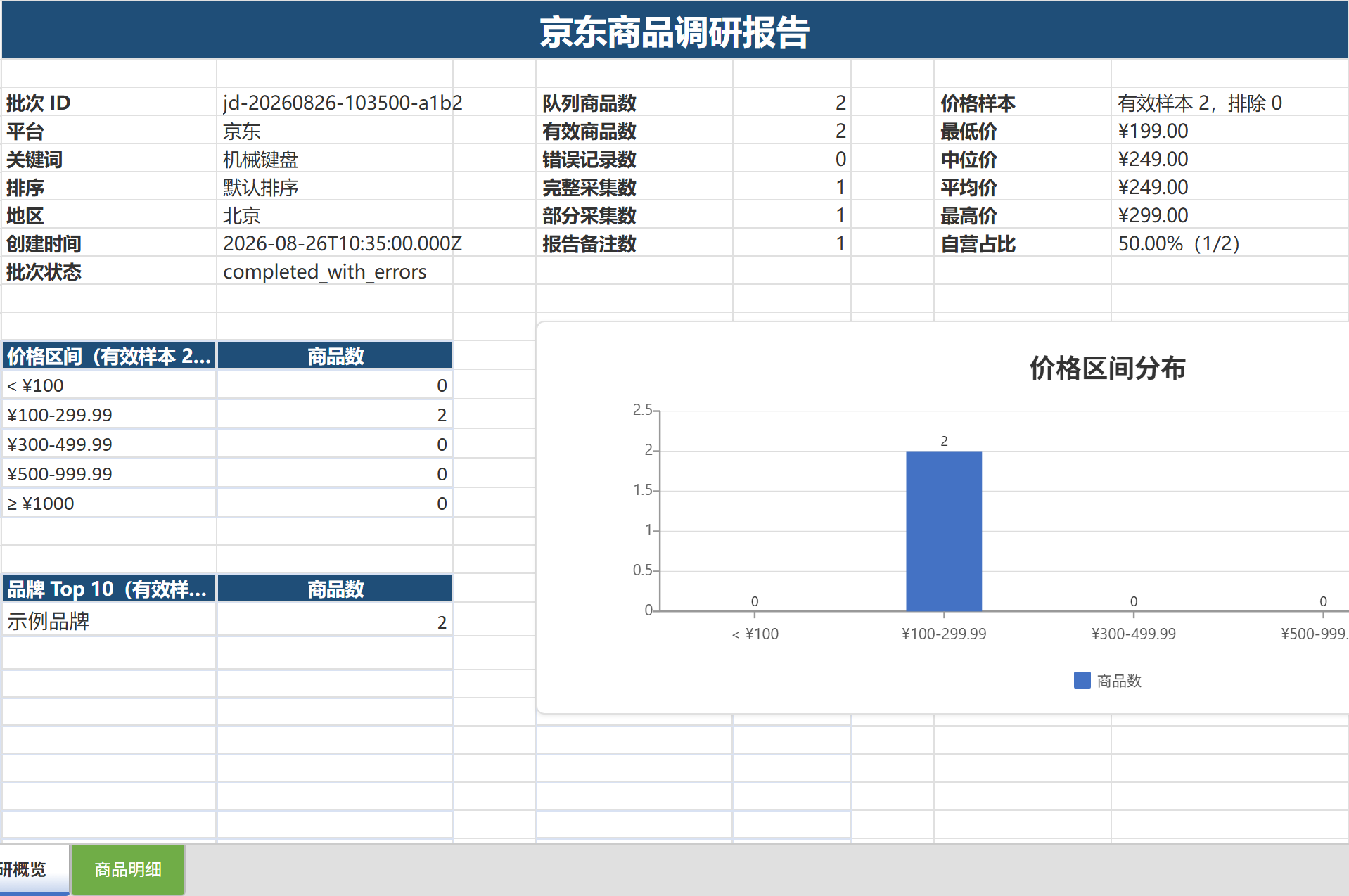
Deliver overview and product-detail sheets with charts, thumbnails, exact amounts, and canonical product links.

DECISION READY ↗
05 — RESUME

Checkpoint and resume

Pause on login, verification, access limits, or interruption; resume the frozen queue without re-searching completed items.

FROZEN QUEUE ↗
06 — AGENT

JSON and agent friendly

stdout carries one result envelope while progress and diagnostics go to stderr—no log cleanup required.

STABLE ENVELOPE ↗

02 / WORKFLOW

From one keyword
to a usable report.

Every step has a clear input, a visible process, and a recoverable artifact.

  1. 01
    KEYWORD

    Define the research

    Choose a platform, keyword, and limit from 1 to 50 products.

    "mechanical keyboard"
  2. 02
    VISIBLE BROWSER

    Connect local Chrome

    Reuse a dedicated profile, sign in yourself, and keep the session observable.

    CDP :53471
  3. 03
    COLLECT

    Collect and validate

    Type progressively, scroll in segments, pause between items, and validate records.

    16 / 20
  4. 04
    RECOVER

    Pause and resume

    Stop on login or verification, then continue the frozen queue after human action.

    resume
  5. 05
    DELIVER

    Generate Excel

    After explicit confirmation, convert a valid batch into a two-sheet report.

    report.xlsx

03 / EXCEL EVIDENCE

From page data
to decisions.

This is more than a table export. Reports preserve sample status, statistical scope, and source links so sourcing, pricing, and competitor analysis remain auditable.

  • Minimum, median, average, maximum, and valid sample counts
  • Five price buckets, top 10 brands/stores, and first-party ratio
  • Images, titles, prices, specs, stock, delivery, and product links
  • Formula-injection defense, image failure isolation, validation, and atomic publish
Read the Excel report guide

04 / SAFETY BOUNDARY

Safety comes from boundaries—not “stealth.”

The project does not rely on stealth patches or fingerprint spoofing. It keeps automation low-frequency, visible, serial, interruptible, and leaves authentication state on your machine.

IMPORTANT

CDP and human-like pacing do not make automation undetectable and cannot guarantee that a marketplace will not request verification. Follow site terms, robots rules, and applicable law, and collect only data you are authorized to access.

DO / BUILT IN
  • Visible Chrome and local CDP
  • Dedicated profile and manual login
  • Progressive typing and segmented scrolling
  • Serial collection and periodic rests
  • Checkpoint and stop on verification
  • No authentication material in batches
DON'T / NOT PROVIDED
  • Headless mode or stealth patches
  • CAPTCHA or verification bypass
  • Browser fingerprint spoofing
  • Cookie, account, or header export
  • Bulk private API calls
  • High-frequency concurrent collection

05 / ADAPTER ROADMAP

Start with JD.com.
Expand market by market.

Each marketplace arrives through an isolated site adapter. Status stays explicit: plans are never presented as working features.

06 / QUICK START

Your first study
in five minutes.

Requires Windows, Node.js 22.12.0+, and Google Chrome. Optional Excel reporting also needs OfficeCLI 1.0.139+.

Read the full guide
PowerShell
# Install from npm
npm install --global e-commerce-cli

# Check the environment and sign in
ecom doctor
ecom login jd

# Collect, inspect, and report
ecom collect jd "mechanical keyboard" --limit 20
ecom status <batch-id>
ecom report excel <batch-id>

07 / FAQ

Before you start,
you may want to know.

What is E-commerce CLI?

E-commerce CLI is a local research command-line tool that uses visible Chrome and CDP to collect product information, compare peer pricing, and produce structured data and Excel reports.

Why does it use visible Chrome?

A visible browser keeps login, page interaction, and exceptional states observable and under human control while the tool performs low-frequency, serial input, clicks, and scrolling.

Does CDP make the automation undetectable?

No. CDP and human-like pacing do not make automation undetectable and cannot guarantee that a marketplace will not request verification. The job pauses for human action when it encounters login, verification, or access limits.

Where are browser and research data stored?

The dedicated browser profile and research batches remain on your machine. Batch folders never copy cookies, Local Storage, request headers, account names, or profile files.

Does Excel export require Microsoft Office?

No. Optional Excel reporting requires OfficeCLI 1.0.139 or newer, but it does not require Microsoft Office and does not affect core collection.

Which marketplaces are supported today?

The current MVP supports JD.com only. Taobao, Tmall, Pinduoduo, Dangdang, and international marketplaces are roadmap items without usable adapters yet.

How do scripts and AI agents integrate?

Main commands support single-line JSON. stdout carries only the result envelope while progress and diagnostics go to stderr, making output stable for scripts and agents.

How can I contribute another marketplace adapter?

Open a GitHub Issue or Pull Request. New adapters should preserve visible browsing, low-frequency serial actions, stop-on-verification behavior, no authentication-data copying, and sanitized fixtures.

OPEN SOURCE / LOCAL FIRST

Turn repetitive research into a reusable workflow.

Start with one JD.com keyword and finish with structured product data, price intelligence, and an Excel report ready to share.